Podcast Ep 78: Where's the DAC?
Where's the DAC? Everything you need to know about digital-to-analog converters

In this episode:
You're probably using a DAC right now — you just don't know it. JR and Huffy kick off this episode with a game of "Where's the DAC?", a series of scenarios where you try to identify which device in the audio chain is handling the digital-to-analog conversion. From there, JR walks through the surprisingly interesting history of how standalone DACs went from a niche audiophile topic to a full product category at Crutchfield — and what the wave of early returns taught the team about setting customer expectations. The big takeaway: a better DAC will reveal how good your music sounds, not fix how bad it sounds. Garbage in, garbage out still applies.
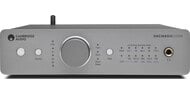
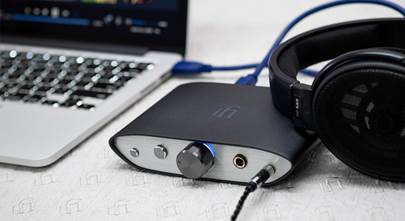
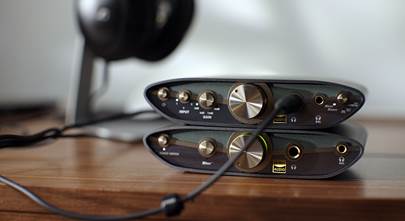
The guys also get into bit rates, sample rates, and why you probably shouldn't lose sleep over which DAC chip brand is inside your gear — but you should know what to look for when it matters. JR discusses three noteworthy standalone DACs worth knowing about: the Cambridge Audio DacMagic 200M, the iFi ZEN DAC 3, and the AudioQuest DragonFly Cobalt. If you have questions or want to tell JR which DAC chip brand you think sounds best, send an email to [email protected]
Links from this episode of Crutchfield: The Podcast
- Cambridge Audio DacMagic 200M (Silver) Stereo DAC/headphone amplifier/preamp with built-in Bluetooth® (Silver) at Crutchfield
- iFi ZEN DAC 3 Desktop USB DAC and headphone amplifier at Crutchfield
- AudioQuest DragonFly® Cobalt Plug-in USB DAC/headphone amplifier, compatible with Apple® and Android™ mobile devices at Crutchfield
- DAC buying guide
- Guide to high-fidelity computer audio
- Intro to high-resolution audio
[01:00:00:00 - 01:00:13:13]
(Music)
[01:00:18:05 - 01:04:53:12]
Hello and welcome to Crutchfield the podcast. I'm your host, JR. And I'm Huffy. And we are back this month to talk about digital to analog converters. Ooh, DACs. DACs baby. Yeah. Big DAC energy. Exactly. You bringing it today buddy? Bringing it. I knew you would. We're gonna talk about what they are, where they are, and why do you need one. And I don't know if you know this. Hmm. Probably already have one. Well yes I do. And I'm not just talking to you, Huffy. Oh, oh you're talking to them. I'm talking to you. They might be using one right now. But maybe that's too soon. If they can hear my voice, there's a DAC involved. That's right. Before we get into the weeds of DACs, we're going to play a game. Ooh. We're gonna call this game, and I'll let you say it's your game anyway. It is. What's the name? What's the game, Huffy? We like to play a little game called "Where's the DAC?" If we could get the rights, I would love to play the Wendy's commercial from the 80s where the nice old lady says "Where's the beef?" Yeah. "Where's the DAC?" That's right. All right, here's how this game works. I'm gonna lay out a scenario. Maybe we can take turns laying out scenarios. Ooh, okay. All right. And the other one of us will guess where the DAC is. We're not gonna really guess. We are not guessing. But maybe we'll pause and let them guess. This game is indeed for you playing along at home. Keep score. Pay attention. We are, of course, on the honor system here. There are zero prizes involved other than maybe some new understanding about how DACs work. I promise at the end we'll tell them why this is important, why they should know where their DAC is. Exactly. All right, scenario one. You ready? Yes. You have a computer connected to a stereo receiver with a mini to RCA audio cable. Okay. The music on your computer needs to be converted to analog for your ears to be able to hear it. Right. Well, I think you just kind of... Where's the... Well, I didn't. It just needs to happen. Well, we haven't mentioned that yet. Where is it? Where is that happening? Where's the DAC? And that scenario? Yeah. Well, give everyone a chance to paint that picture at home. Paint that picture. And... Well, it's in the computer. There you go. It's in the computer. How do we know that? Because it's turned into analog. Yeah, because that mini to RCA cable, that's the clue there. That is an analog cable. So it cannot transmit digital information. So that digital music has to have already been converted to analog. There you go. That's it. Cool. Scenario number two. You want to take it? You want me to do it? Oh, I can try. Go for it. We'll see. All right. You have a computer. I think we've already done this one. Different scenario. Okay. All right. You have a computer connected to your home theater receiver wirelessly over Wi-Fi. Okay. Yeah. So that you can access all of those high-res digital files using your home theater receiver's remote or an app on your phone as long as your computer is turned on. You select a song and play it from your computer, but on your home theater speakers. Where's the DAC? So you might think it's in the computer. Well, there is one there, but is that the one you're using? It is not the one you're using. I believe you're using the one in the home theater receiver. That is correct, because that's what's powering your speakers. So that's what's taking that digital file and turning it into analog. Yeah. It's digital coming into the home theater receiver wirelessly, right? So that's where the conversion has to happen. That is right. Number three. You have music on your smartphone and maybe your streaming title, and you're listening on some cheap Bluetooth headphones. Okay. I think we all have a pair of those or two or three. Where's the DAC? Fortunately, it's in those headphones. Yes, it is. So you're streaming this high res audio is awesome content. Yeah. But because you're doing it wirelessly, those ones and zeros from that digital signal are flying through the air into those headphones. Those headphones have to take that digital signal, make it analog, therefore using the DAC and the headphones. And it's probably not a very good DAC. I bet you a lot of people don't realize that there's even a DAC and a cheap pair of headphones. No, they do not. Right. All right. So now number four. You found your old iPod and a pair of wired earbuds. You charge it up remarkably, it still holds a charge and you're reveling and the joy of your playlist you had from almost 20 years ago. Where's the DAC?
[01:04:56:03 - 01:05:49:09]
I'm going to go with in the iPod. You would be correct. There's only one DAC in this scenario. Right. You got a digital file, but you got it hooked up with wires. And so that iPod from 20 years ago has a DAC that's 20 years old. Yeah. I'm sure it was a great one. Doing the job of converting that old digital music into analog. So those wired earbuds will work. I guarantee you 20 years ago, you did not care about a DAC. Nope. No, no to care about it. We're going to get into that a little later with my history. I know. I know. I'm excited. That was dramatic foreshadowing. Number five, and this is the last scenario. You have a CD transport connected to an integrated amp with an optical cable. You have a nice collection of CDs and a really nice audio system made for two channel music listening. You pop your CD in and hit play. Where's the DAC?
[01:05:50:12 - 01:06:45:09]
The amp. The key there was CD transport. That's a little sneaky. That's not something. I don't think we've talked about that in a podcast. No, that could be a whole separate episode right there. Oh, you did it again. Basically, that means it's kind of like a CD player, but it doesn't have a DAC. So we don't call it a CD player. It's basically a file reader, a digital file reader, if you will. Yeah. It's one job is to spin the disc and use a laser to extract the information and nothing else. It doesn't even convert that information into usable analog audio. It sends it out to another place to get that done. That's right. Yeah. So how many did you get right? You there at home. If you got them all right, well, you actually do understand the job of a DAC pretty well. And if you missed any, then this and the rest of what we have to say in this podcast might be new information for you.
[01:06:50:17 - 01:08:24:03]
And now it's time for a history lesson. History by JR. So my history with DACs, at least my understanding of DACs, goes back to when I started here. In June of 1996. Wow. Wait, Kirchfeld's that old? Kirchfeld's older than that. DACs were really only for audio files back then. We had about five minutes of training on DACs because we didn't really sell any standalone separate DACs. We had to know what they were and that they existed in digital equipment like CD players and laser disc players and things like that back then. But it was not a topic of conversation on the regular at all. A few years after that, though, computers and Napster and MP3s, they kind of became a big deal. And we were all very enamored with the convenience and the accessibility of music for the most part at the cost of sound quality. Right. I know with Napster and MP3s, when I was in school back around that time, man, I had a huge music collection. Let's not, never mind how I got that huge music collection, but I had like all the music. All the music? Yeah, all the music had it, but it didn't sound very good. No, because we were compressing those files down so they were so small, you could fit a bunch of them onto a CDR that you burned on your computer. Right. Or played on a cheap little MP3 player before we even had iPods.
[01:08:25:12 - 01:10:55:18]
It didn't take too long for those file formats to evolve though. And a few years later, we all started to have, or at least have access to high res audio files, stuff that was CD quality or better. Yeah. Well, I even remember back then when I was downloading those digital files, I had a choice. I don't even think back then I knew what that meant. I just knew that, well, this file is a little bit bigger, bigger is better. That must be the one that I want. Yep. This is when websites like HD tracks became available and you can purchase and download high res music files. That's right. Purchase. That's exactly what I did. And CDs could not hold very many songs if they were in high res. You could get hundreds of MP3s on them, but if you had a high res music file, you might not even be able to fit an entire album onto a CD. And so suddenly we had a lot of people with large wave files or flak files on their computers and their computers. So that became your source. That's what you connected to your home stereo to play your music. Now we also had a lot of people with, that still had a lot of MP3 files on their computers, you know, downloaded, however they got downloaded. And they had so many songs that they were also using their computers as a music source rather than burn thousands of songs onto CDs, though many did that as well. So on both sides of that, the high res side and the convenient MP3 side, people are using their computers as a source into their home stereo. I remember doing that exact thing. There I was in school. I had a ton of music on my computer and then ran a long mini jack, RCA to mini. I think that's the scenario we painted earlier, right into my receiver. And voila, that's how you did that. That's how you did it. You came right out of the headphone jack of your desktop PC, maybe your laptop into some RCA inputs on the back of whatever your stereo system was. All of a sudden I miss Winamp. I remember that. And that's when people started to notice that the audio from the computer was just not as good as like playing a CD was, for example. Super convenient to have all that music at your fingertips, but you could definitely tell something was missing. It wasn't the same. Exactly. And for MP3s, technically a lot was missing. That's where we get into that compression.
[01:10:56:22 - 01:13:50:20]
Compression is literally the act of removing some data that you might not miss to make the file size smaller so that you can fit more on the CD and such. And for some people, they would, well, for a lot of people, and it would be true, they would say that CDs are even compressed, but we're taking it even further, like a higher rate of compression. Yes. And for those larger high res files, the people that had those on their computer, they started to realize that the DAC, the digital to analog converter in their computer, was indeed the one responsible for converting those massive amounts of digital data into an analog audio signal that could be amplified and sent onto their speakers. And if you knew enough to know that, then you thought, oh gosh, the DAC in my computer, even a really nice computer, just is not that great. So we started to see standalone DACs become a thing, a product category, a home audio consumer electronics thing that people could buy. And looking back on it, it almost feels like it was an overnight thing that we went from never talking about DACs to talking about them three or five times a day with our customers. We had trainings on DACs, new vendors were coming in all the time showing off their DACs. We were ready to sell some DACs, baby. And then the return started coming in. Yeah, kind of at an alarming rate, actually. So much so that we had to really dig into it. And what we found was that a lot of people misunderstood what all a DAC was supposed to do for them. It's not a magic wand. It's not going to make that maybe inferior file necessarily sound as good as the CD. In fact, it's not going to do that at all. No, in fact, the opposite. It will reveal just how bad your low res music file is. That's right. And that's why it became really important that we set expectations and we educate our customers as to what the job of a DAC is. Yeah, we did a whole round of additional training here. We wrote articles, put them on the website and in the catalog, trying to help our advisors who are working directly with our customers and directly our customers understand that DACs don't fix low resolution music. And if you don't have high res music, you might not even benefit from a separate DAC at all. That's right. And I think you kind of hit the nail in the head there. I'm going off script here, but you said a separate DAC at all. And I think, you know, we've already told the listeners, you know, if maybe they weren't super familiar with the DAC before, that they might be listening to one right now. Some people might be thinking, well, I don't, I've never bought a DAC. That's not something I have.
[01:13:51:23 - 01:17:59:10]
Hmm. How am I, I don't have one of those in my pocket right now. I wouldn't know if I had one in my pocket. Yeah, you would have paid good money for it. That's right. But, but everything you have that has digital music, there has to be a DAC somewhere in the chain. Right. And it's either in the CD player or in your iPhone or in your computer or in your home theater receiver or your stereo receiver or any and all of those places, your headphones, right? It could be in any of those places, but it can also be a standalone piece of equipment, right, that you sit next to those things and connect it to those things wired or wirelessly so that it can do the job of digital to analog conversion. There we go. And we had a bunch of them. Yeah. And we were selling a bunch of them. Right. And they were coming back at an alarming rate. So we've started to funnel every one of those orders for standalone DACs through a group of specialists just to make contact with those customers so that we could make sure their expectations were reasonable. Right. For what it was going to do for their music. Right. And they would have conversations like, do you have high res music on a computer? And if the customer said, what is high res music? Right. Yeah. If they were, so we wanted to know that before we sent it to them, if they were expecting it to take their MP3s and make them sound great. Right. It's just not going to do that. So we wanted those expectations to not be out of whack. We wanted them to be in whack. And so today, all of our advisors go through extensive training on digital to analog converters, high res music, how to get the most out of it. And we don't have to funnel those orders through a specialist group anymore because we can all do that. And our website tries hard to set those expectations. And frankly, we're kind of past the early phases of this being a separate category. And most people understand what they're for now, if they know about them at all. Right. So what we've realized over the years is that most people have no idea what a deck is, that they already have multiple decks built into their audio gear, and why they might want to consider a better deck. Right. Not all decks are created equal. That's what I'm hearing. Exactly. And we're going to get into how do you know? And how do you know if you need one at all? And why you might need one? And which one you maybe you should get. Remember those scenarios in our little game from earlier at the top of the show? Yeah, I went three for three. The deck was already in one of your existing components and all of those examples, your phone has a deck, your computer, your Bluetooth headphones, etc. Anything that receives digital music in and turns it into analog music that you can hear from a speaker has a deck. I think it's probably important to also realize that in a scenario where you have multiple digital, you just mentioned a lot of things. And sometimes people you know, use their phone to play something off their computer, their computer to play something like you usually only do that conversion once, which means you can have multiple digital items in a chain, right? Yeah. And a signal flow. And usually that digital analog conversion is only going to happen once. There's exceptions to that, of course, but 99% of the time it only happens once. So you may have a really good deck and then not be using it. Yeah. 100%. And like so many things, if you separate out the deck from the other gear, you can upgrade it. You get a better one. I work with someone who likes to call that granularity. Yeah. It's kind of like upgrading your phono preamp for your turntable. Okay. So for those vinyl nerds out there, if you're into vinyl, then you might be aware that your, your, your record player needs a phono preamp and it's either built in or it's a separate thing. And a separate thing is better than having it built in like nine times out of 10. Just like a separate deck can likely do the digital to analog better than one that's built in, unless you bought some really high end gear. And the decks that we sell separately today come in all shapes and sizes and are usually purpose built for different situations.
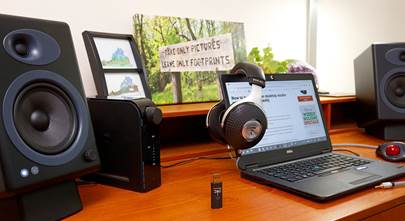
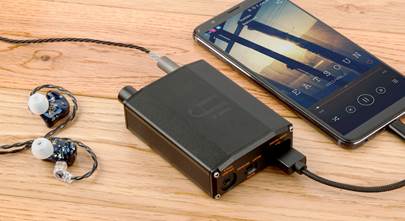
[01:18:00:15 - 01:19:34:00]
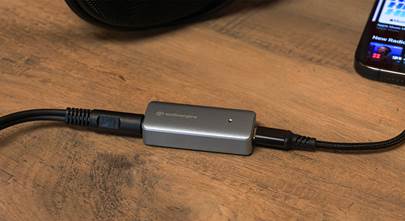
There's decks made to sit on your desktop between your computer and your stereo system. They connect with a USB cable from your computer and then an analog cable to your audio gear. So the deck happens in between those two cables. There are portable decks designed to connect to your smartphone with like a USB-C cable, and then they have a headphone out. So instead of plugging your headphones into your phone with a dongle or going Bluetooth, you use wired headphones with a deck that's also a headphone amp. So you're not using your phone's tiny little deck or your headphones tiny little deck. And there are wireless decks to take in music over Bluetooth or even over wifi, convert it to analog and then send it on to your analog audio gear already converted. And there's more, there's more form factors than that, but those are the big ones. Right. And you know what's still true? What's true. If you start with low res music files, your new deck will reveal how bad they sound. That's the garbage in garbage out scenario. A really high end, well put together thought out audio system, give you a wonderful representation of a crappy audio signal. And on the flip side, if you start with high res music files, your deck will give you all of the resolution that you paid for. Right. And that's really who should be considering a standalone or separate D to a converter. And of course, there's many different brands of DAX as well, not just the devices that we sell that are called D to a converters, but anything with a DAX.
[01:19:35:05 - 01:20:14:03]
Often you will see what specific DAX they put in that piece of gear. This reminds me of like the 90s when we were buying computers and they would say Intel, you know, like you buy your Dell computer and it would say Intel inside, right? And that was like a badge of, Hey, this has a good chip in it. This is pretty much the same thing. Yeah. And the DAX brands that we're talking about are names like ESS Sabre, Texas Instruments, Wolfson, Burr Brown, there's more. Yes, those are some big ones. This is an abbreviated list of really nice brands of D to a converters.
[01:20:15:09 - 01:21:14:17]
And just like with any audio gear, it won't take you much Googling to find web pages, forums, galore, where people are debating which one of those brands of DAX is better for this or for that, or in their opinion, in those opinions, everyone has an opinion. Everyone really does. How do you know which of those brands is best? How do you know, Huffy, if you were faced with figuring it out, let's say you bought a CD player and a, and a stereo receiver, right. And they both have a deck in them. Okay. Yeah. Let's say the CD player has a Wolfson deck. Ooh, fancy. And the stereo receiver has an ESS Sabre deck. Ooh. So I've doubled up on my DAX here. You've got two DAX. Okay. And really to, to, I probably wouldn't need to do that. No, you wouldn't buy, you might just be buying nice gear and you end up with two great DAX. That can happen. Which one's better.
[01:21:15:20 - 01:23:03:23]
There's only one way to tell. How is that? How would you tell? I would try it out. I would hook it up one way to try out the CD players deck and hook it up another way to try. Ooh, pop quiz. Yeah. The second part of the quiz, how would I hook that up to hear the DAX in the CD player? If you want the DAX in the CD player to be the DAX, then you're going to need to let the DAX do its job and then take the analog outputs from your CD player over to your stereo receiver. Because if they're analog cables, the music has to have already been converted. That's right. Analog cable, that means that conversion has already happened. It's not going to go back to digital at that point. It's done. So if you do it that way, you'll be listening to the Wolfson DAX, your CD player. So then if I were to hook it up the other way with an optical cable, optical or coax or coax digital out, from your CD over to the stereo receiver, the music is still digital. So it hasn't converted over to analog as of yet. Therefore I'm using the receivers DAX, the ESS Sabre DAX. And if you have the cables necessary to do both types of hookups, you know what you can do is play your favorite song, listen to it, switch the hookups, listen to it again. Then you can immediately log online, go find one of those places where people talk about this thing and call everyone an idiot that didn't agree with what you're finding was. I think you have to do that, right? And some people are going to do exactly what we just described and some will come away saying that Wolfson sounds amazing. It's so much better. And the next person is going to be "No, what are you talking about? The ESS Sabre is so much warmer and fuller and better." And then some people would be like, "I think I heard a little bit of a difference there. I like this one better."
[01:23:05:00 - 01:26:15:18]
It's probably subtle. Both of those are really good. Yeah. So here's the deal. We're not here to tell you which of those brands makes a better DAX. We're never going to be able to answer that question to everybody's satisfaction. And it changes, right? Like ESS Sabres had multiple versions and are continuing to develop different versions of their DAX along with Burr Brown and Wolfson and all the companies. So unless you're going to buy them all and compare their sounds side by side to make your determination for which one is best, you really shouldn't worry too much about this. That's literally the message of this part of the show. If a company has spent the money to put a really nice DAX into a piece of gear, say a CD player or an integrated amp, and they advertise which DAX they put in there, ESS Sabre, Wolfson, Burr Brown, et cetera, you know they cared enough about the sound to put a good DAX in it at all rather than just going like, say, with an off the shelf unnamed brand of DAX. Right. Rest assured it's going to be better than the average DAX. So you would say, what DAX is on your phone right now? I have no idea. Yeah, there you go. So usually if you're buying a standalone DAX where it mentions the brand of the chip, then it's better than the one on your phone. I'm sure some of our listeners out there going, "Oh, I know exactly what DAX is on my iPhone." Right. And iPhones are awesome. Don't get me wrong. It's just, you know, there's better ways to do that part. And if you have the ability to discern the actual differences in audio going through one DAX versus another, you have super hearing. You might be an audio file and you might already know which DAX brand suits you best. You might not even still be listening to this show. Or you're just curious to see which side of the fence we're going to come down on. And now you're not happy with us. For the rest of us though, just go with something good. You will sleep well at night knowing your digital music files are in good hands as they get converted into sine waves that can be amplified for your ears to enjoy. Now there are some specs that you should pay attention to when you're shopping for a DAX. There's ways to know that, you know, things that separate the DAX you are buying and will it work well with... Nope, there we go. So there are some specs you might want to pay attention to. There's some ways to know that the separate DAX you might be considering will work with your high res music. And there's numbers on the box is what you're saying. Bit rates and sample rates baby. Exciting. Every standalone DAX will give you a, it's the compatible bit rates and sample rates that it will work with. Bigger numbers are better here. Right. And at least better in that they will work with your highest resolution audio tracks. I mean really is that simple. I mean it really is. You'll see bit rates like 16 bit is what a CD has. Anything more than that is high res. You'll see 24 bits, 32 bits, things like that. Sample rates, you'll see numbers going up into the thousands.
[01:26:16:20 - 01:31:39:01]
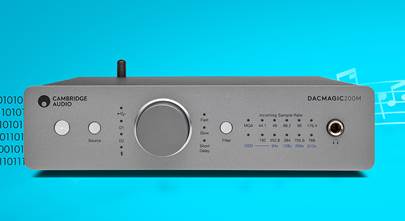
So it's not uncommon to see a high res music file referred to as a 2496. 24 bits, 96,000 samples per second. That's what the DAX is doing. It is taking a look at how much information is on in your digital music file. And then how many times does it refresh that look per second? And you have files that are compatible and DAX that are compatible with those files. You kind of got to kind of have to understand that. Yeah. But really you just got to make sure the DAX can do what your files are. Right. So pay attention to what your bit rate is of your music and make sure that your DAX can bring in that information. And if the music's on your computer, you can usually just like right click on it or hover or on your Apple get info and see all of the detailed information about that music file. You'll be able to tell what the bit rate and the sample rate is on that file. Yep. You'll also want to pay attention to DAX that can deal with DSD, DXD and MQA files. Quick, what did all those stand for? Yes. And we're not going to get into the detail there. No, no, thank goodness. You know, it really does turn into alphabet soup when you start going down this rabbit hole a little bit. Yeah. It doesn't need to though. No, it doesn't. It doesn't. If you know what DSDs are, then when you are shopping for a DAX on our website, there's a filter that will help you find ones that can convert your DSD files. But these don't follow the same bit rate, sample rate numbers that I just gave you for regular music files. So if you have DSD files, you'll know it. Same with DSX and MQA files. And it's pretty easy to make sure the DAX you're buying can deal with those file types, at least if you are shopping for your DAX on Crutchfield.com. And if you're dealing with those file types, you kind of, I'm guessing you probably already know what we're talking about. Yeah. You're ahead of the curve. Yeah, for sure. Absolutely. You want to talk about some specific DAX and why we like them so much? I do. So yeah, if it hasn't been made clear through this episode so far, many of the things you buy that play digital music have DAX in them. So we have been talking about those. Right. But we are also talking about standalone devices you can buy that do just that. Yeah. That's their job, is to convert digital music into analog music, to take files from your computer, from your phone, from the internet, on your Wi-Fi, and make it an analog audio signal that your amplifier can then amplify and send on to your speakers. There we go. That DAX can be anywhere. I want to get into, I want to highlight three standalone DAX that should be on your radar if you're thinking that a DAX might make your music sound better. I dig it. The first one, and this is probably our most popular DAX. We talk about it all of the time. We feature in our new hire training for our advisors because they will be talking about it a lot with customers. It is a desktop or component style DAX. It looks at home with your stereo system just as much as it does on your desk next to your computer, and you can put it in either place. The DAX I'm talking about is made by Cambridge Audio. It's called the DAX Magic 200M, and it is a top selling DAX. This thing is exactly what a lot of our customers are thinking about looking for when they're looking for a standalone DAX. It checks a lot of boxes. Something I love about it, multiple inputs, multiple digital inputs. In that way, it kind of becomes a little bit of a preamp because you can switch between different sources with it, and it'll unpack those digital files from multiple things. So maybe you have a CD player and a computer and a network streamer. You have a bunch of digital sources. You can take multiple digital sources into this and come out actually with balance connectors even if you wanted to into a nice amp of... It's a solid little piece. I'm a big fan of that. It's like the Swiss Army knife of digital Dandelion converters. USB, Bluetooth, coax, optical, all of those, plus twin ESS Sabre 32-bit DAX. Two of them, one for the left, one for the right in a dual mono configuration. And on top of all of that, it's a decent headphone amp too. So this standalone DAX technically has two DAX chips in it. Double the DAX. Right. Two's better than one. And it's gotten quite a lot of really nice reviews from our customers. We sell quite a few of them. We talk about them with our customers regularly. And if you're not sure, yeah, it's a pretty great little DAX. It's not even a crazy expensive piece of machinery either. So pretty reasonably priced for a DAX. You can buy much more expensive DAX out there. Of course. You got another product recommendation? Yes. Yes, I do, Huffy. It's called the IFI Zen DAX III. Ooh. Okay. It's a very relaxing D to A converter if I do say so myself. Oh, because of the Zen part, right? I'd like to tell you more about it. Oh, please do. You want something a little smaller, maybe something to sit on your desktop next to your computer, but that can also be taken on the go to work or anywhere with a wired connection to your phone.
[01:31:40:06 - 01:34:17:09]
Something that one of our verified Crutchfield customers described as petite and powerful in their online review. Then you might be looking for an IFI Zen DAX III. I like that it's portable and yet still kind of has that aesthetic that it would look really nice next to a computer. Yeah. It does both. That's cool. Smaller than the Cambridge audio, but not tiny, right? Like it's still substantial enough that you can hold it in your hand and really feel like it's a solid piece of gear. So it can actually be powered off of your phone. Indeed it can. Okay. Now out of the box, you would plug it in with the USB cable to your phone and it would be powered by your phone. If you plugged it into your computer, it would be powered by your computer. There's also an optional separate power cord available from IFI so that if you do want to give it its own dedicated power, you can, but that's not necessary. That's optional. So that's really flexible. Very flexible. And it can do all the files. It can do MQA. It can do incredibly high bit rates. It can do DSD. Like it's a pretty sweet Burr Brown in this case, D to A converter and portable and petite and powerful. And that's the way I like to think about it. I think I've heard that before. Yes. And the most portable option is the AudioQuest Dragonfly Cobalt. Oh, we love this thing. This thing's so great. It is tiny. It is like dongle sized. It has a USB-A built into the end of it. Yep. No cable needed. If your computer or your phone only has USB-C, they include a USB-C adapter. Yep. Perfect for laptops on the go, phones, tablets. And in addition to being the DAC, it's also a really good headphone amplifier. We have absolutely done A-B tests to see what kind of a difference this thing makes. It will make most headphones sound better all by itself just because it's amplifying them better than the headphone jack on your computer can do. Right. To me, it looks like a thumb drive, right? It looks like a thumb drive, but it lights up cool with that little dragonfly on the top of it. It does. And it's Cobalt Blue. It's in the name. Yes. Looks nice. I dig it. All right. I think that's it, Huffy. I think we've expelled everything we had to say about DACs. Is there anything left? Are there any stones left to be turned? I wish I had more puns for you in this episode. I wish you did too. I just can't unpack any right now. I don't know. That's a stretch. They might not get that.
[01:34:18:10 - 01:34:23:15]
I think you did a good job. Well, so did you. Aw, thanks. This was a team effort today, buddy.
[01:34:24:22 - 01:35:15:19]
Crutchfield the podcast is recorded here at Crutchfield headquarters in beautiful Charlottesville, Virginia. We don't do this in a vacuum. It's maybe Huffy and me hosting the show, but we have help from behind the scenes. Dom will be reviewing this episode to make sure that all of the stupid things we said got edited out and are indeed on the cutting room floor. Abby and Alexis will be looking for your comments on our socials. So if you have questions for us, you can post them there. You can also send us emails podcast at crutchfield.com. We will be putting links in the show notes to the things we've been discussing today. There are articles that I'll put there, links to all three of the DACs we just recommended for you and more. All of that can be found in the show notes wherever you're listening to this podcast. The best place though might be crutchfield.com slash podcast. That's where everything lives here.
[01:35:16:23 - 01:35:21:01]
And I think that's it. I think we should just end this show now. I think we should thank somebody first.
[01:35:22:04 - 01:35:32:03]
Yeah, you probably right. Bill Crutchfield, thank you so much for continuing to pay us to talk about the coolest stuff on the planet. Thanks, Bill. Thank you, Bill. Peace out, everybody.

Comments (0)